[ILLUSION] Koikatu! - Card Sharing Request Thread 2.0 (Restart)

A

AdoArtsXIII

Well-known Member
Joined
Dec 2, 2025
Messages
24
Reaction score
89
Points
13
Credits
1,015
Does anyone know if a card/headmod of Jiyan (Wuthering Waves) has been made? I would love to have him in my male character collection. ( •̯́ ^ •̯̀)
I've never seen a mod or card of him in Koikatsu. The only thing I saw was some artist porting him with the OBJ import plugin or something like that, just to make yaoi animations. It's really sad, he has such a peak design. I never understood why Lor never made him, or some other male characters from Hoyo games and Wuthering Waves :/
 
A

AdoArtsXIII

Well-known Member
Joined
Dec 2, 2025
Messages
24
Reaction score
89
Points
13
Credits
1,015
Q

qwex

Member
Joined
Sep 13, 2024
Messages
8
Reaction score
11
Points
3
Credits
800
Female Cards link can not work😣
<Error>
<Code>NoSuchKey</Code>
<Message>The specified key does not exist.</Message>
</Error>

EDIT:
When I clicked download again, it worked normally.
The vik1ngfile website might be a bit unstable. Thank you.
 
Last edited:
C

cnm77

Active Member
Joined
Sep 30, 2025
Messages
134
Reaction score
79
Points
28
Credits
1,305
are harumame and japs only creators who do long scenes with story/speech bubbles etc.
 
Guardian

Guardian

Veteran Member
Joined
Jun 6, 2025
Messages
588
Reaction score
460
Points
63
Credits
8,221
I was talking about the iofi and anya cards, that you can also find them both there, but if you already have them and their passwords then you just can ignore my previous post cuz those two are the only holo cards that have their passwords leaked, that's why I asked about the risu card password to begin with...
Ah sorry, the way you worded that had me think there were more cards if I looked further down somehow.
 
D

Dudeske

Member
Joined
Oct 14, 2025
Messages
41
Reaction score
12
Points
8
Credits
640
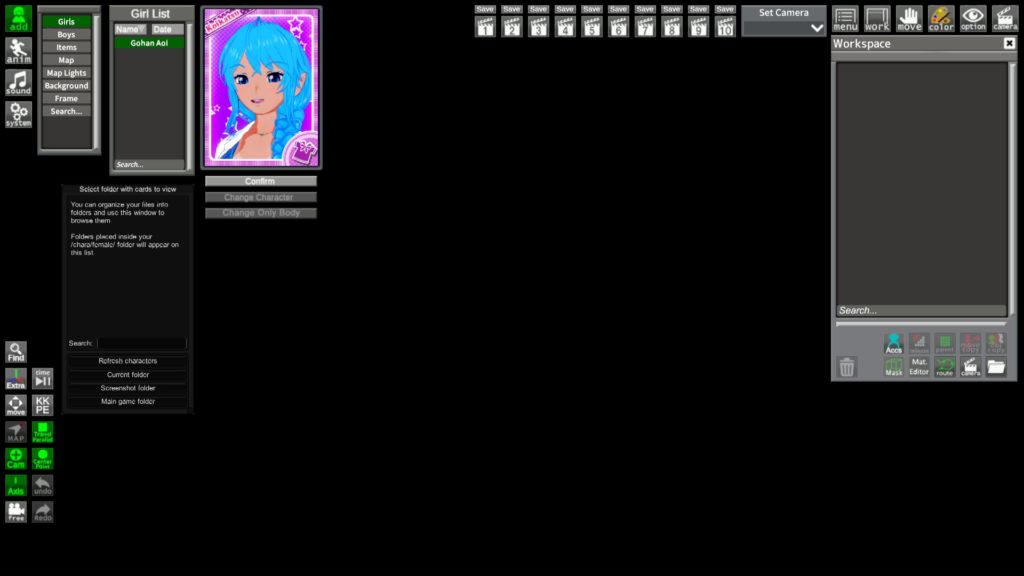
Koikatsu-Chara-Studio__2021-11-24-11h26m50s678-1024x576.jpg

In the workspace, you'll see several options at the bottom of the window. Select the character in question, click on Mat. Editor, and you'll open the Material Editor window for that character. In the CharaStudio version, everything is compiled in the same window (head, clothing, hair, accessories, etc). It's worth noting that you can only modify the shaders and masks, not the accessories or clothing themselves.

For that, you'll need to use another plugin, "Studio Pseudo Maker" which is installed by pasting the .dll file into (Koikatsu folder/BepInEx/plugins/<here>).
Credits and a bigs thanks to Rikki Ballboa for her great contribution to the community with her plugin.
Thank you for your advice, but unfortunately it didn't help me. I did exactly as you wrote, but the changes with the shader didn't help. At the moment, I tried to write to the author of the scene, hoping he will respond me...
 
B

beckytwom

Senior Member
Joined
Mar 18, 2025
Messages
260
Reaction score
259
Points
63
Credits
3,330
anybody have pan baidu account to download this and can share?
 
Last edited:
KojiMMD

KojiMMD

Senior Member
Joined
Feb 11, 2025
Messages
111
Reaction score
311
Points
63
Credits
3,915
Ah sorry, the way you worded that had me think there were more cards if I looked further down somehow.
Nah, sorry man, wish that I had them but nah, I'm as clueless as ya, if for some reason you get any of them don't hesitate to hit me with a dm (or quote me here, doesn't matter)!
 
S

saba

New member
Joined
Aug 29, 2025
Messages
2
Reaction score
4
Points
3
Credits
150
Hi guys, When I play a timeline scene, the screen doesn't move, just the time passes, and when I stop the timeline scene, the scene moves only as much as the time has passed. I'm looking for a way to fix this. Please.
I'll upload that scene together

 
S

saba

New member
Joined
Aug 29, 2025
Messages
2
Reaction score
4
Points
3
Credits
150
Hi guys, When I play a timeline scene, the screen doesn't move, just the time passes, and when I stop the timeline scene, the scene moves only as much as the time has passed. I'm looking for a way to fix this. Please.
I'll upload that scene together

I solved it by accident. It plays when I delete "CameraFrameMask.Koikatu.dll" this file. Have a nice day everyone
 
muipoop69love

muipoop69love

Veteran Member
Joined
Sep 17, 2024
Messages
373
Reaction score
958
Points
93
Credits
9,610
A

agentahegao

Member
Joined
Jan 7, 2026
Messages
3
Reaction score
14
Points
3
Credits
530
G

Given

Active Member
Joined
Aug 24, 2025
Messages
8
Reaction score
38
Points
13
Credits
820
Last edited:
T

TMG1130

Veteran Member
Joined
Mar 30, 2025
Messages
126
Reaction score
578
Points
93
Credits
6,555
Hi guys, When I play a timeline scene, the screen doesn't move, just the time passes, and when I stop the timeline scene, the scene moves only as much as the time has passed. I'm looking for a way to fix this. Please.
I'll upload that scene together

Open timeline and disable animation tab. It'll be fine in my experience.
 
Splooderr

Splooderr

KK Master
Joined
Aug 23, 2024
Messages
272
Reaction score
2,021
Points
93
Credits
21,190
Saw that ASGF put out his Kanade OC, was hoping someone got their hands on it for sharing
 
Eudoxus

Eudoxus

KK Master
Joined
Aug 24, 2025
Messages
324
Reaction score
2,801
Points
93
Credits
29,035
Some genius decided to repath the record feature to Ctrl + E in the latest update rather than it being the Character Exporter

Anyone know how I can fix this? Nothing says what the new shortcut for Character Export is
 
F

fengxieliuli

Active Member
Joined
Dec 9, 2024
Messages
107
Reaction score
76
Points
28
Credits
1,480
Is there a way in the studio to make imported audio pause when the timeline pauses and play when the timeline plays?
 
Kroak27

Kroak27

Senior Member
Joined
Oct 24, 2024
Messages
114
Reaction score
267
Points
63
Credits
3,415
Some genius decided to repath the record feature to Ctrl + E in the latest update rather than it being the Character Exporter

Anyone know how I can fix this? Nothing says what the new shortcut for Character Export is
F1 should still take you to where all of the shortcut key commands are, right? From there you can type in "Character Export" then remap it back to Ctrl + E.
 
Eudoxus

Eudoxus

KK Master
Joined
Aug 24, 2025
Messages
324
Reaction score
2,801
Points
93
Credits
29,035
F1 should still take you to where all of the shortcut key commands are, right? From there you can type in "Character Export" then remap it back to Ctrl + E.
Nevermind I'm stupid

It's not baseline in the KK patches, had to go fetch it again (and it's a pain in the ass now that all the links were taken down from Deathweasel's Github page for some reason

Here's the link for those looking for it

Koikatsu Character Exporter
 
MomokaDaisuki

MomokaDaisuki

Veteran Member
Joined
Oct 19, 2025
Messages
324
Reaction score
627
Points
93
Credits
6,940
I have a question: How do you all manage your SD cards?
Is it best to keep the original ZIP file and only keep the necessary SD cards?
My storage is nearing its limit, so I'd appreciate advice on proper management methods.
Yeah i got a similar problem. The only solution is make an archive into your Google Drive or MEGA accounts.
Also, just delete files that you won't touch ever again.
 

Similar threads

S
Replies
2K
Views
574K
deepdive
D
kloeny233
Replies
1
Views
12K
kloeny233
kloeny233
Top
これは閲覧専用の自動翻訳ページです。返信・検索・ログインなどの操作は、オリジナルの英語版サイトへ移動してください。 英語版で開く (Open in English) ×